Disclosure: This site may earn a commission if you buy through links on this page or elsewhere on the site. For bunk beds, always check the manufacturer instructions and current safety guidance before building, modifying, or using any bed.
A bunk bed TV setup can make a shared room more comfortable, but it also adds cords, screens, shelves, and furniture near a climbing path.
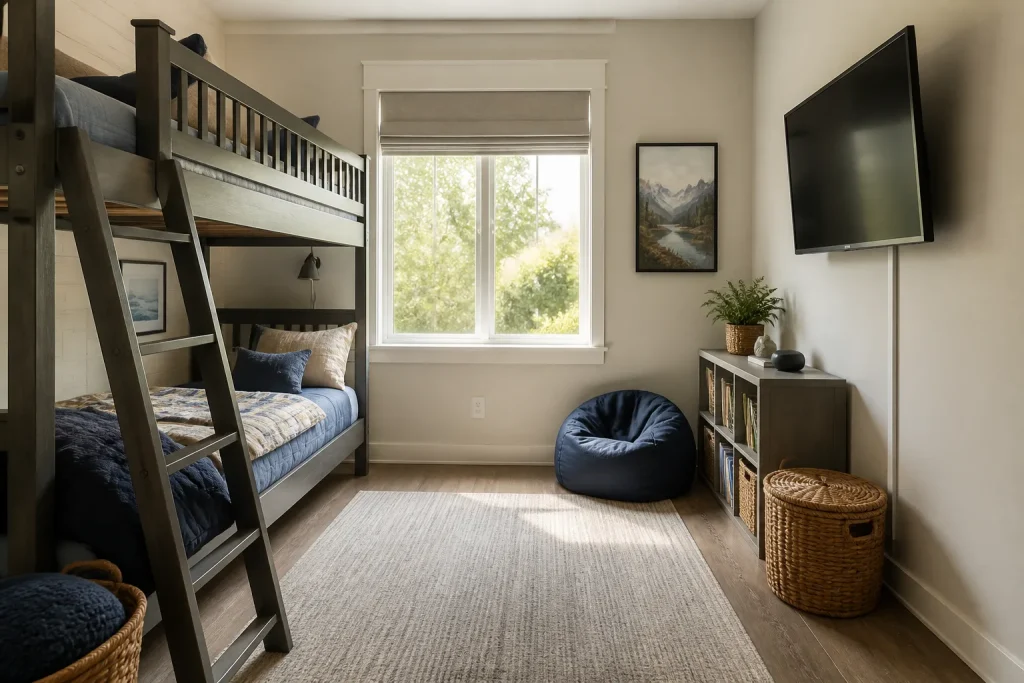
Plan the screen around safety and daily use first: the ladder must stay clear, the top bunk should not need awkward leaning, and cords should not cross the floor or bed.
Table of Contents
Quick Answer
The safest bunk bed TV setup usually puts the screen on a wall or stable furniture outside the ladder path, with cords routed away from the bed and no heavy electronics attached to guardrails. Keep viewing angles comfortable from the lower bunk or room seating instead of encouraging top-bunk leaning.
| Setup choice | Safer check |
|---|---|
| Wall-mounted TV | Use correct anchors or a professional installer. |
| TV on dresser | Keep it stable and away from ladder landing. |
| Tablet holder | Use a light holder that does not stress guardrails. |
| Cords | Route along wall, not across ladder or bedding. |
| Top bunk viewing | Avoid leaning over rails or twisting near the edge. |
Keep the Ladder Path Clear
Do not place a TV stand, gaming console, power strip, or speaker where someone steps down from the ladder. The landing area needs to stay boring and open.
If the room is small, a wall-mounted screen or a tablet on a lower desk may be safer than adding another piece of furniture.
Mounting Needs Real Hardware
A wall-mounted TV is only safer when it is mounted correctly for the wall type and screen weight. Drywall anchors, studs, masonry, and rental restrictions all matter.
Do not attach heavy screens, shelves, or speakers to bunk bed guardrails unless the bed manufacturer specifically allows it.
Control Cords and Heat
Route power cords and HDMI cables along the wall, not under rugs or across the ladder. Keep power strips visible and away from bedding, pillows, curtains, and storage bins.
Small rooms can trap heat around electronics, so leave ventilation around consoles and streaming devices.
| Item | Avoid |
|---|---|
| Power strip | Buried behind pillows or under bedding. |
| Extension cord | Crossing the ladder landing. |
| Console | Sitting on the top bunk mattress. |
| Remote basket | Hung from a rail with heavy items. |
| Speakers | Loose on a high shelf above the sleeper. |
Use Seating When Possible
A chair, beanbag, or lower-bunk view can reduce the temptation to watch from the top bunk edge. If a top-bunk sleeper needs a screen, a lightweight tablet used while seated back from the rail is usually simpler than a TV.
Find the Viewing Angle Before Choosing a Screen
A person on an upper bunk watches from a very different height than someone sitting on the lower bed. Test both positions before drilling: have each viewer sit or recline normally, look straight ahead, and mark where the screen would be easiest to see without repeatedly twisting the neck. Viewing distance and angle depend on the screen size and room layout.
| Viewing need | Practical solution | Check first |
|---|---|---|
| Upper bunk only | Wall-mounted screen opposite the pillow end | Viewing angle, wall structure and ladder clearance |
| Both bunks | Swivel-capable wall mount if approved for the screen and wall | Reach, secure mounting and no moving parts near bed rails |
| Temporary or dorm room | Small screen on a stable freestanding unit | Furniture stability and permitted room modifications |
| Occasional videos | Tablet on a stable lap stand when seated safely | Charging away from bedding and no overhead clamp |
Keep the Electronics Separate from the Bunk Frame
- Mount TVs to an appropriate wall or separate approved furniture, following screen and mount instructions; avoid drilling the bunk posts or guardrails.
- Route power and signal cords along the wall and away from ladders, mattresses, rail openings and walking routes.
- Keep chargers and power strips in open, dry locations; do not cover them with pillows or bedding.
- Position the screen outside climbing, rolling and slide paths, and verify it cannot be struck during bed-making.
- Check cords and fixtures periodically for damage or loose hardware.
Test the Setup with a Paper Screen Template
Cut a rectangle of paper or cardboard the size of the proposed screen and tape it temporarily to the intended wall position without drilling. From both beds, check whether you can see the center without straining and whether the screen would be hit when a person climbs down. Move the mock screen until it clears the ladder route, then confirm the selected wall mount supports that position and the screen’s weight.
A TV placed high for the top bunk may be uncomfortable to watch from a lower bunk. The solution might be a modestly sized swivel-mounted screen with approved reach, or two different viewing arrangements. Avoid improvised clip-on mounts suspended from bed rails and never let a charging cord cross the user’s climbing path. In a dorm, confirm wall mounting rules before purchasing hardware.
A small wall screen can work, but the best plan may be a separate seating area if both levels cannot watch without awkward posture. For bedroom footprint checks, use the room-fit calculator.
Related Guides
For safe top-bunk storage, read top bunk storage ideas. For night storage near a bunk, see bunk bed nightstand ideas.
FAQ
Can you mount a TV on a bunk bed?
Do not mount a heavy TV to the bunk frame unless the manufacturer specifically approves it. A wall mount or separate furniture is usually better.
Where should cords go in a bunk bed TV setup?
Route cords along the wall and away from the ladder, bedding, and floor landing.
Is a tablet better than a TV for a bunk room?
Often yes. A tablet is lighter, easier to move, and avoids adding a large screen or heavy mount near the bed.