Disclosure: This site may earn a commission if you buy through links on this page or elsewhere on the site. For bunk beds, always check the manufacturer instructions and current safety guidance before building, modifying, or using any bed.
A gaming room bunk bed or loft bed can free up floor space for a desk, monitor, console, or storage. The mistake is treating the bed like a backdrop instead of a structure people climb and sleep in every day.
Plan the sleep zone, ladder, desk, cables, lighting, heat, and walking path together. A clean setup is safer, easier to maintain, and better for actual use.
Table of Contents
Quick Answer
A good gaming room bunk bed setup keeps the ladder clear, places screens and cables away from climbing paths, uses low-heat lighting, preserves ventilation around electronics, and keeps the upper bunk mattress within the bed manufacturer limits. If the desk sits under a loft, confirm head clearance and avoid mounting heavy gear to bed rails.
| Area | Better setup |
|---|---|
| Desk under loft | Measure seated head clearance before buying. |
| Cables | Route along walls, not across ladder or floor paths. |
| Lighting | Use low-heat LED strips away from bedding. |
| Console/PC heat | Keep vents open and off soft bedding. |
| Upper bunk | Use correct mattress thickness and keep rails clear. |
Three Gaming Bunk Bed Layouts That Work in Different Rooms
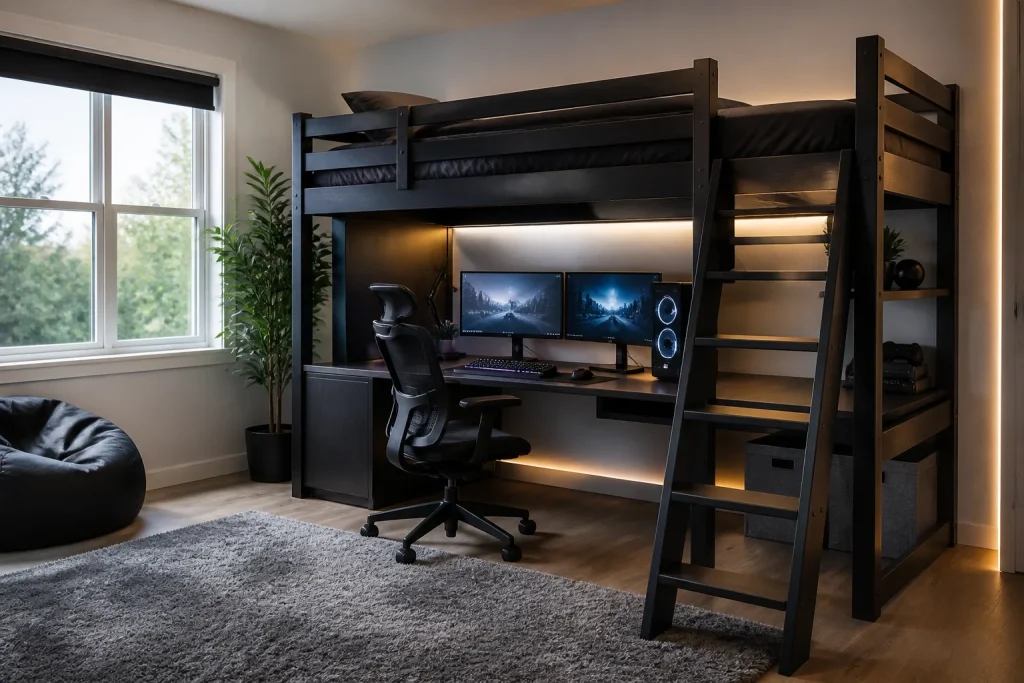
For a setup with a bed on top and a gaming desk below, search for a loft bed with an under-bed workstation. A traditional bunk has a lower mattress, so it usually cannot hold a full-height desk in the same location. The bed must be designed for this arrangement; removing the bottom bunk or attaching a loose tabletop to the rails is not a safe shortcut.
| Layout | Best use | Fit checks |
|---|---|---|
| Independent desk under a loft | PC or laptop gaming plus study | Chair height, seated headroom, monitor depth, reachable power and ladder opening |
| Wall-mounted screen with low chair | Console gaming where desk depth is limited | Wall structure and suitable mount, viewing height, clear exit and a stable chair |
| Desk beside a traditional bunk | Two sleepers who still need a gaming station | Separate desk footprint and ladder landing; no obstruction of the lower bunk |
Measure the Person Sitting at the Desk
Measure from the floor to the underside of the loft’s lowest obstruction, then measure from the floor to the seated user’s head on the actual chair. For example, if the underside is 58 inches high and the person’s seated head reaches 51 inches, the apparent head gap is 7 inches. That is only a measurement example, not an approved clearance standard; leaning back, standing, adjusting the chair and reaching shelves may consume the gap. Test these movements before committing to the layout.
For screens, the U.S. Occupational Safety and Health Administration recommends placing a monitor directly in front of the user, with its top at or below eye level and generally around 20–40 inches from the eyes, adjusted for comfortable reading. See OSHA’s monitor placement guidance. Under a low loft, do not raise the screen so high that the player must crane their neck.
Laptop, Monitor Arm and Cable Decisions
- Gaming laptop: use an independent, stable desk with ventilation, never a loose plank across rails or a soft cushion that blocks air inlets.
- Wall-mounted monitor: install only where the wall and mount are rated for the screen and the installation instructions can be followed; do not fasten a monitor to an unapproved bed post or guardrail.
- Desktop PC or console: leave the ventilation space stated in the device manual and make the power switch reachable without crawling behind the bed.
- Cables and lights: keep cords away from stairs, the ladder, bedding and any pinch point. Never drape cables, belts or strings from guardrails.
Before purchase, tape the full outside bed footprint on the floor along with the desk, chair pullback and ladder landing. A smaller monitor and a narrower freestanding desk may be a better gaming upgrade than trying to turn the bed structure into shelving.
Start With the Ladder Path
The ladder path decides where everything else can go. Do not place chairs, cords, headphones, backpacks, or storage bins where someone climbs down in the dark.
If the ladder blocks the best desk position, choose a different bed style before forcing the room layout.
- Keep the ladder visible and unobstructed.
- Do not run power cords across climbing paths.
- Keep controllers and bags off ladder rungs.
- Use a bedside shelf only if the manufacturer allows it.
- Keep the floor clear near the landing area.
Desk and Monitor Clearance
A desk under a loft bed needs seated head clearance, monitor depth, chair movement, and cable access. Measure the person sitting in the chair, not just the desk height.
Avoid mounting heavy monitors or shelves directly to the bed frame unless the manufacturer specifically allows it.
| Item | Check |
|---|---|
| Chair | Can roll or slide without hitting posts. |
| Monitor | Does not force neck strain. |
| Keyboard tray | Does not block ladder or drawers. |
| PC tower | Has airflow and is not under bedding. |
| Power strip | Mounted safely away from feet and fabric. |
Lighting and Heat
LED strips can work well, but keep them away from bedding and do not wrap cords around rails. Choose lighting that can be switched off from the desk and bed without climbing awkwardly.
Consoles and PCs need airflow. Do not place electronics on mattresses, pillows, or soft storage bins.
Upper Bunk Safety Still Comes First
CPSC guidance says bunk beds with mattress foundations more than 30 inches above the floor need guardrails, and guardrails must extend at least 5 inches above the top of the mattress. Do not let gaming accessories reduce rail height or block exits.
If the setup makes the bed harder to climb, clean, or inspect, simplify it.
Related Guides
For loft planning, read loft beds for 8-foot ceilings. For bunk bed games and kids rooms, see safe bunk bed games.
FAQ
Can I put a gaming desk under a loft bed?
Yes, if there is enough seated head clearance, airflow, and a clear ladder path.
Are LED strips safe on bunk beds?
Use low-heat LEDs, keep cords managed, and avoid placing lights or wires where they touch bedding or ladder paths.
Can I mount a monitor to a bunk bed frame?
Avoid it unless the bed manufacturer allows it. A wall mount or desk arm is usually safer.